

Introduction
Homework help videos are everywhere. YouTube, Khan Academy, TikTok, Chegg and even AI-powered tools that now explain answers step-by-step.
When your child gets stuck on a math problem, reaching for a video explanation has become as natural as opening a textbook used to be.
The question isn’t whether your child will use these videos. They already are. The real question is whether you have clear rules for how, when, and how much. The same is increasingly true for AI homework helpers that can instantly generate explanations or solve problems.
Why do Homework Help Videos need their Own Rules?
Videos can accelerate understanding or replace genuine learning. That is the double-edged sword.
A well-made video explaining quadratic equations might help your child grasp a concept faster than reading the textbook. But the same video can become a crutch that prevents them from developing problem-solving skills.
The American Academy of Pediatrics emphasizes that educational content still requires active engagement. Watching alone does not automatically lead to learning.
The biggest risk is what researchers call the “answer provider” problem. Some videos solve problems for students rather than with them. Your child watches the solution, copies the steps, and moves on without understanding why those steps work. Many AI math problem solvers and AI homework helper tools can also provide complete solutions instantly, making it even easier for students to skip the thinking process.
It looks like progress in the moment, but the lack of understanding becomes clear when test time arrives.
What are the Five Rules for using Homework Help Videos Effectively at Home?
This framework builds on guidance from the Child Mind Institute, Scholastic, and Scripps Health, adapted specifically for video-based learning.
1. Attempt First, Video Second
Students must try the problem independently before reaching for video help. Set a minimum of 10 to 15 minutes of genuine effort.
Have them document what they have tried before watching. If they cannot articulate where they are confused, they have not tried hard enough yet. This rule applies whether your child is using homework help videos or an AI homework helper. Trying first matters regardless of the tool.
2. Active Watching
Passive video watching violates every principle of active learning.
Require:
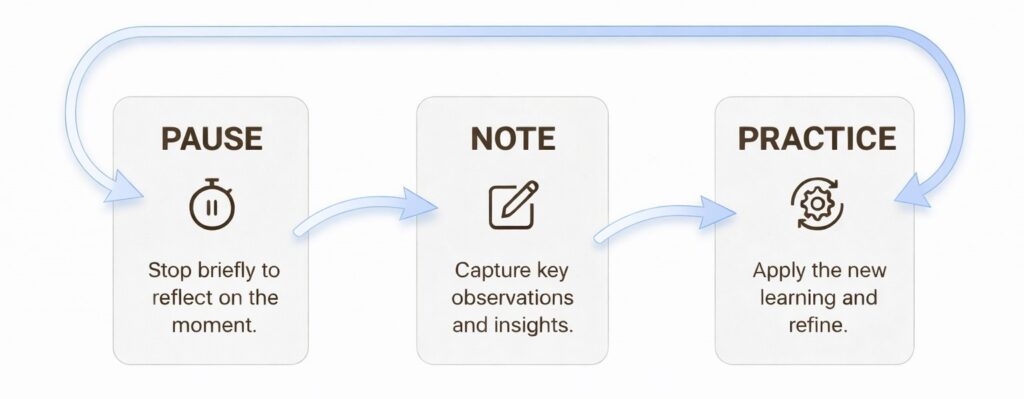
- Note-taking during videos, using a physical notebook rather than the device
- Pausing after each concept to summarize in their own words
- Closing the video before attempting similar problems
The teach-back method works well here. Before returning to homework, have your child explain what they learned. If they cannot articulate it clearly, they need to rewatch.
Active engagement is especially important when using AI for homework, since answers often appear instantly unless students slow down and reflect.
3. Time Limits on Video Homework
Ideally, video time should not exceed 25 percent of total homework time.
- For a 6th grader with 60 minutes of homework, the maximum is 15 minutes of video help.
- For a 3rd grader with 30 minutes, cap videos at 7 to 8 minutes.
Set a timer before starting any video. This prevents the “just one more video” trap.
4. Pre-approve platforms and channels
Quality criteria to establish:
- Is the instructor credentialed?
- Does the video explain concepts or just provide answers?
- Is it free of excessive ads or distractions?
Khan Academy is a strong starting point. It is nonprofit, ad-free, and includes parent monitoring tools. Ninety percent of teachers who use Khan Academy report it as an effective learning support.
Pick a small number of reliable platforms and guide your child’s choices as they explore new ones.
5. Weekly effectiveness check
Rules mean nothing without follow-through.
A simple weekly check-in:
- Can your child solve similar problems without the video?
- Are grades improving or declining?
- Is homework taking longer than it should?
If a student completes homework correctly but struggles on tests, the videos might be masking rather than filling knowledge gaps.
Adjust by Grade
The five rules apply universally, but implementation should shift based on developmental stage.
1. Elementary School (K to 5): Co-Viewing Model
- Watch videos together, pausing to discuss
- Keep videos under 5 to 7 minutes
- All platforms must be explicitly approved
2. Middle School (grades 6 to 8): Supervised Independence
- Check what videos were watched weekly
- Videos up to 10 to 12 minutes are acceptable
- Students start making platform choices within your guidelines
3. High School (grades 9 to 12): Autonomy with Awareness
- Students manage their own video use
- Monthly check-ins replace weekly monitoring
- Focus on outcomes such as test scores and grades
What are the Warning Signs Parents should Watch for?
Even with clear rules in place, it is important to watch for signs that video or AI help may be doing more harm than good:
- Your child refuses to start homework without using a video or AI tool. This may mean the tool has become a crutch.
- Your child watches the same video many times but still does not improve. This suggests the format is not working for that topic.
- Your child does well on homework but struggles on tests. This may mean the videos are hiding learning gaps.
- Homework takes much longer than expected. This may be a sign that videos are distracting your child and slowing down their work.
What to do
Return to the “attempt first” rule and give your child more time to work through problems before turning to help. If homework help videos are not making a difference, consider whether a tutor might be more effective, especially for students who need real-time interaction and feedback. It can also help to communicate with teachers about what you are noticing at home so you can adjust support together.
Start with One Rule this Week
The goal is not to eliminate homework help videos. They are valuable when used correctly and when they support learning rather than replace it.
Start with one rule this week and add another next week. Building habits takes time, and your child may push back at first, but consistency matters. The patterns you establish now will shape how your child approaches learning for years to come.
Frequently Asked Questions
The 10 minute rule suggests 10 minutes of homework per grade level. A 3rd grader gets 30 minutes and an 8th grader gets 80 minutes. For homework help videos, limit video time to 25 percent of this total. A 6th grader with 60 minutes of homework should spend no more than 15 minutes watching instructional videos.
The clearest indicator is whether your child can solve similar problems independently without the video playing. If they complete homework correctly but struggle on tests, the videos may be providing answers rather than building understanding.
Yes. Elementary students benefit from co-viewing with parents and shorter videos of 5 to 7 minutes. Middle schoolers can have more independence with weekly check-ins. High schoolers should manage their own video use with monthly reviews focused on outcomes.
Khan Academy is a strong starting point. It is nonprofit, ad-free, and includes parent monitoring tools. Tools like Think10x.ai, which convert images of problems into short video explanations, can also be helpful when they focus on explaining concepts rather than simply giving answers. The key is establishing quality criteria. Look for credentialed instructors, clear concept explanations rather than just answers, and alignment with your child’s curriculum.
Warning signs include refusing to start homework without video access, watching the same video repeatedly without improvement, completing homework correctly but failing tests, and homework taking significantly longer than expected.
AI homework helpers and homework help videos serve similar purposes. Both can support learning when used carefully, but both can also replace thinking if students rely on them for answers. The same rules apply: attempt first, active engagement, and limited use.
Build Better Learning Habits at Home
For parents who want explanation-first learning instead of answer-only tools, Think10x helps turn homework questions into clear, step-by-step explanation videos that focus on understanding, not just final answers.
 Try it now for free at Think10x.ai