

Introduction
If you have ever wondered what captions are and why they matter in education, the answer is straightforward: they make educational videos accessible, clearer, and more useful for every student, not just those with disabilities.
Learning with videos has become the default in higher education and online learning. But a video without captions asks every student to keep up in real time, under whatever conditions they happen to be in. A transcript gives them something to hold onto. A caption gives them a second channel to follow along.
This article covers what captions and transcripts are, who benefits from them, and how to start implementing them.
What is the Difference Between a Caption and a Transcript?
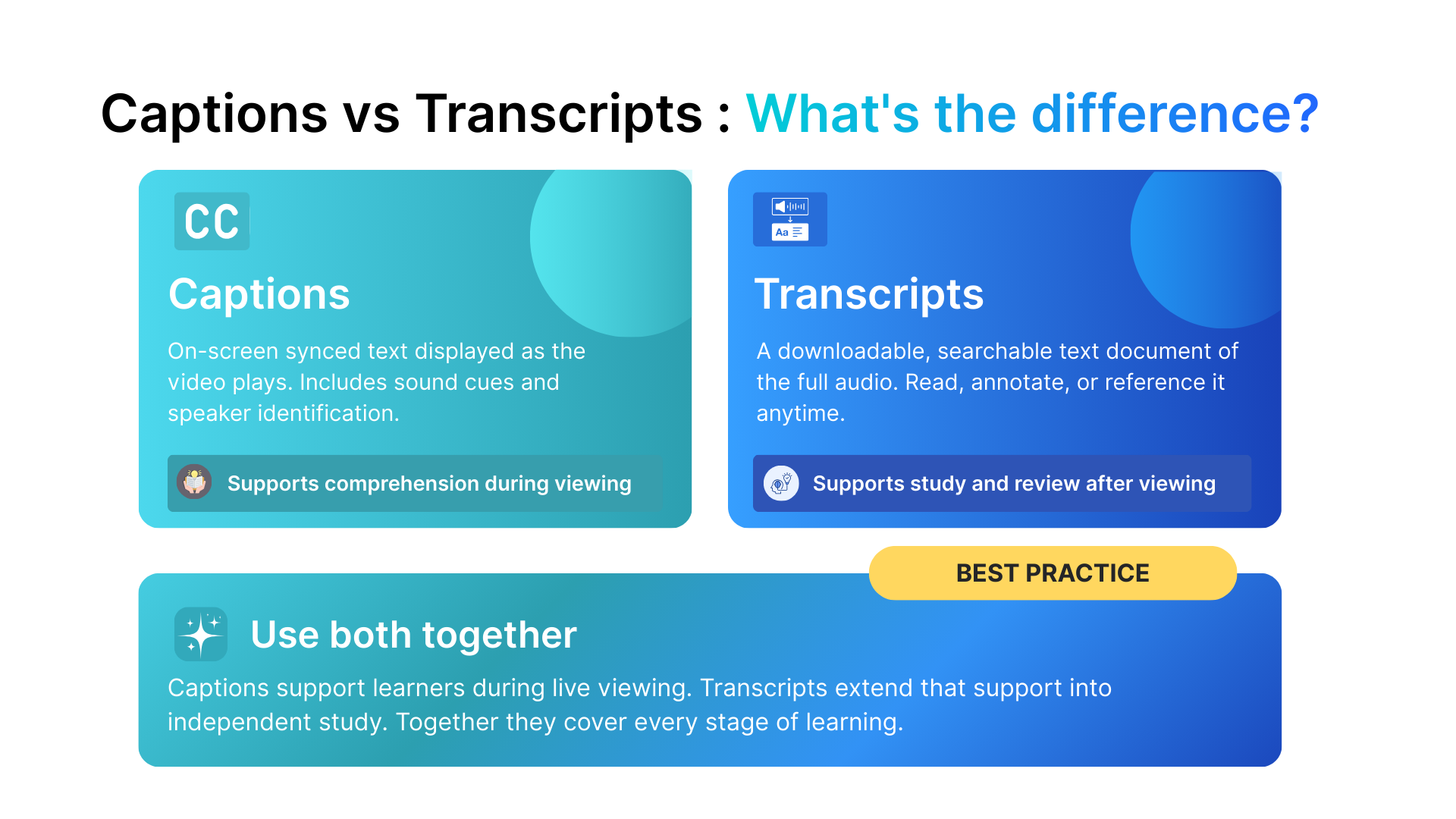
These two terms are often used interchangeably, but they work differently and serve distinct purposes.
Captions are synchronized text that appears on-screen as a video plays. They capture spoken dialogue, identify speakers, and describe relevant sound cues. A student reading captions while watching a video is receiving the audio content through two channels simultaneously: what they hear and what they read.
Transcripts are standalone written documents containing the full text of a video’s audio. A student can download, print, search, or annotate a transcript without ever re-watching the content.
What are open captions, closed captions, and subtitles?
- Closed captions can be turned on or off by the viewer. Most video platforms support this as a toggleable option.
- Open captions are permanently embedded into the video and always visible, regardless of viewer settings.
- Subtitles are primarily used for language translation. They convey dialogue but typically do not include sound descriptions or speaker identification.
For accessibility and learning support, closed captions are the standard.
Why Captions and Transcripts Matter: The Evidence
1. The SF State case study
In a case study at San Francisco State University, Professor Greg Collins introduced captions to instructional video materials used with his students. Compared to peers who watched the same content without captions, the captioned group:
- Was measurably more engaged in class discussions
- Recalled specific names and details from the videos more readily
- Showed improved comprehension and test performance compared to the uncaptioned group
2. The King’s College London study
A 2022 peer-reviewed study published in the International Journal of Educational Technology in Higher Education (Dommett et al., King’s College London) examined the effects of captions and transcripts on lecture capture use among undergraduate students.
Key findings:
- Captions and transcripts did not significantly change how often students accessed recorded lectures
- They did not alter MCQ test scores
- Students consistently reported feeling better supported and more confident when reviewing material with text alternatives available
3. The Steinfeld real-time captioning study
A study by Aaron Steinfeld, Ph.D., published in the Volta Review (1998) and drawn from his University of Michigan dissertation, examined the effect of real-time captions on student recall in a classroom environment. For hearing students, recall accuracy increased by 9.8 percent when real-time captions were present compared to a traditional presentation with voice only. For students who were Deaf or hard of hearing, the accuracy increase was 149.6 percent.
It is important to note that these figures apply specifically to real-time captions during live instruction, not to captions on pre-recorded video. While research also supports recall benefits for captioned pre-recorded content, the effects tend to be more modest. The finding is nonetheless significant because it demonstrates measurable recall improvements for hearing students, not only for students with hearing loss.
Who Benefits From Captions and Transcripts?
1. Students who are Deaf or hard of hearing
Captions are the foundation of accessible media in education. For students with hearing loss, they are not a convenience but the primary access point to video-based instruction. Without captions, a recorded lecture or instructional video is simply unavailable to them. Every word spoken, every concept explained, every discussion captured on video exists only for students who can hear it, unless captions are present.
2. English language learners and international students
Spoken language moves fast, accents vary, and academic vocabulary is dense. Captions allow students still building English fluency to:
- Read alongside the audio at their own pace
- Match pronunciation to spelling in real time
- Pause to look up unfamiliar terms without losing the thread of the lecture
3. Students in noisy or restricted-sound environments
Not every student has a quiet space to study. Libraries, shared housing, public transportation, and campus common areas are all real study environments. A student watching a lecture with captions can follow the content fully without audio.
4. Learners with cognitive and processing differences
Students with dyslexia, ADHD, or auditory processing difficulties often benefit from receiving information through more than one channel at once. Seeing text on screen while hearing the same words spoken strengthens comprehension and reduces cognitive load, particularly in subjects with dense technical vocabulary.
5. All learners, across the board
Captions help everyone. Students with no disability, no language barrier, and no environmental challenge still retain more and stay more engaged when captions are available.
How Transcripts Support Learning Beyond Accessibility?
1. Transcripts become study materials instantly
A well-formatted transcript is a ready-made study document. Students can:
- Search for specific terms without scrubbing through video
- Highlight and annotate key concepts
- Review material at their own pace and in any order
- Print or save for offline study
2. Transcripts help educators, not just students
Teachers can use transcripts from recorded sessions to:
- Review exactly what was covered
- Develop quiz and assessment questions directly from the content
- Ensure consistency across different sections of the same course
- Provide accurate catch-up material for students who missed a class
3. Transcripts make content searchable
Search engines cannot index audio or video. A text transcript is fully crawlable, making published course content, tutorial videos, and recorded webinars significantly more discoverable. Video-only content is invisible to search engines. Transcribed content is not.
4. Transcripts extend the life of the content
A lecture transcript can be repurposed into:
- A blog post or article
- A structured study guide
- Flashcard sets
- A written reference resource for the course
Where to Start: Tools That Make It Simple
Adding captions for videos does not require technical expertise. The four tools below cover the most common educator workflows and are free to get started.
| Tool | Best for | Free option? |
|---|---|---|
|
YouTube Studio |
Videos already on YouTube |
Yes, built in |
|
Zoom |
Recorded live classes and meetings |
Yes, included |
|
Descript |
Editing and polishing pre-recorded files |
Yes, basic tier |
|
Otter.ai |
Quick standalone transcripts from any recording |
Yes, with limitations |
A few things worth knowing before you start:
- All four tools generate captions automatically. None produce publish-ready results without a review pass. Budget 20 to 30 minutes to check a 10-minute lecture for accuracy, especially technical terms and subject-specific vocabulary.
- Otter.ai’s free plan limits you to 3 lifetime file imports for existing recordings. Live recording minutes are tracked separately and subject to their own monthly cap.
- Placement matters. Put the transcript directly below the video, not behind a tab or in a separate resources section. If students have to look for it, most will not find it.
Already using Think10x?
Think10x is an AI-powered platform built for educational content creation. Unlike the tools above, which require a separate captioning step after recording, Think10x generates captions and transcripts automatically as part of the platform workflow. If your institution is already using it, the process described above is handled for you.
What the Research Shows: An Honest Summary
| Finding | Source | Note |
|---|---|---|
|
Captioned group showed improved comprehension and test performance; greater engagement in discussions |
SF State University case study, Prof. Greg Collins (2013, American Indian Culture and Research Journal) |
Case study, not a randomized trial |
|
Captions improved student perceptions of learning support; MCQ test scores were not measurably different |
Dommett et al., King’s College London, Int. Journal of Educational Technology in Higher Education (2022) |
Peer-reviewed, n=129 |
|
58% of students with disabilities reported feeling unwelcome at university due to accessibility barriers |
UCL Students’ Union survey report |
Survey data, UCL context |
|
Captioned video consistently supports vocabulary acquisition and comprehension for language learners |
Teng, F. (2022; 2023) |
Strong evidence base for ESL context |
Frequently Asked Questions
Captions are synchronized text displayed on screen as a video plays. They capture spoken dialogue, identify speakers, and note relevant sound cues. In education, they matter because they give every student a second channel to process spoken content, which improves comprehension, engagement, and recall across all learner types.
A caption is time-synchronized text that appears on screen while a video plays. A transcript is a standalone written document containing the same content, which a student can read, search, annotate, and reference without returning to the video. Captions support comprehension during viewing. Transcripts support study and review after viewing.
No. Research consistently shows that captions improve comprehension, engagement, and recall for all learners, including students in noisy environments, non-native English speakers, and students with cognitive processing differences.
Live captions appear on screen in real time during a class, lecture, or event, rather than being added after the fact to a recording. Their benefits include:
- Students who are Deaf or hard of hearing can participate in live sessions on equal footing with hearing peers
- Non-native English speakers can follow fast-paced discussion without falling behind
- All students can stay oriented during complex explanations, particularly in subjects with dense or unfamiliar terminology
- Live captions create a real-time record of the session that can be saved as a transcript immediately after class
Tools like Zoom, Google Meet, and Microsoft Teams all offer built-in live captioning. For higher-accuracy live captioning in formal settings, CART (Communication Access Real-time Translation) services provide a human captioner working in real time.
In the United States, public institutions are subject to ADA Title II, with DOJ-mandated compliance deadlines of April 24, 2026 (larger jurisdictions) and April 26, 2027 (smaller ones). Section 508 covers federal agencies and federally funded programs. Private tutors and course creators are not directly covered by Title II, though platform policies or other laws may still apply. Consult a legal professional for guidance specific to your situation.
Begin with auto-generated captions from your video platform as a starting draft. Review for accuracy, paying close attention to technical vocabulary. Format the transcript with paragraph breaks, speaker labels, and timestamps, then place it directly below the video on your course page.
Yes. Search engines cannot index audio or video, but they can fully crawl text transcripts. Transcribed content is discoverable in search results. Video-only content is not.
Final Thoughts
Most educators who do not caption their videos are not indifferent to their students. They are busy, the process feels unfamiliar, and nobody has made it a requirement yet.
But consider what is actually happening without captions. A student in a noisy flat cannot follow the lecture without headphones. An international student hits an unfamiliar term, loses the thread, and rewinds three times. A student with a processing difficulty watches the same ten-minute video four times trying to absorb what a classmate understood on the first watch. None of these students are going to email to say the video needed captions. They will just struggle quietly, or give up.
Captions and transcripts do not solve every problem in education. But they remove a specific, preventable barrier that affects more students than most educators realize. The tools are free, the time investment is modest, and the process becomes routine once it is built into how you publish.
The only question is whether it becomes standard practice or stays an afterthought.